
In today’s digital world, your computer is basically the front door to your personal life. From banking details to private photos, everything is stored online or on your device. That’s why understanding how can you protect your home computer is more important than ever.
Cyber threats are becoming smarter, but the good news is that protecting your home computer doesn’t have to be complicated. With a few smart habits and basic security tools, you can significantly reduce your risk of hacking, viruses, and data theft.
Let’s break it down in a simple, practical way so you can apply it right away.
Why Computer Protection Matters
Before learning how can you protect your home computer cyber awareness, it’s important to understand the risks:
- Malware and viruses can steal your data
- Hackers can access personal accounts
- Phishing emails trick users into giving passwords
- Weak security can lead to identity theft
Even basic home users are targets, which is why cyber awareness is essential for everyone.
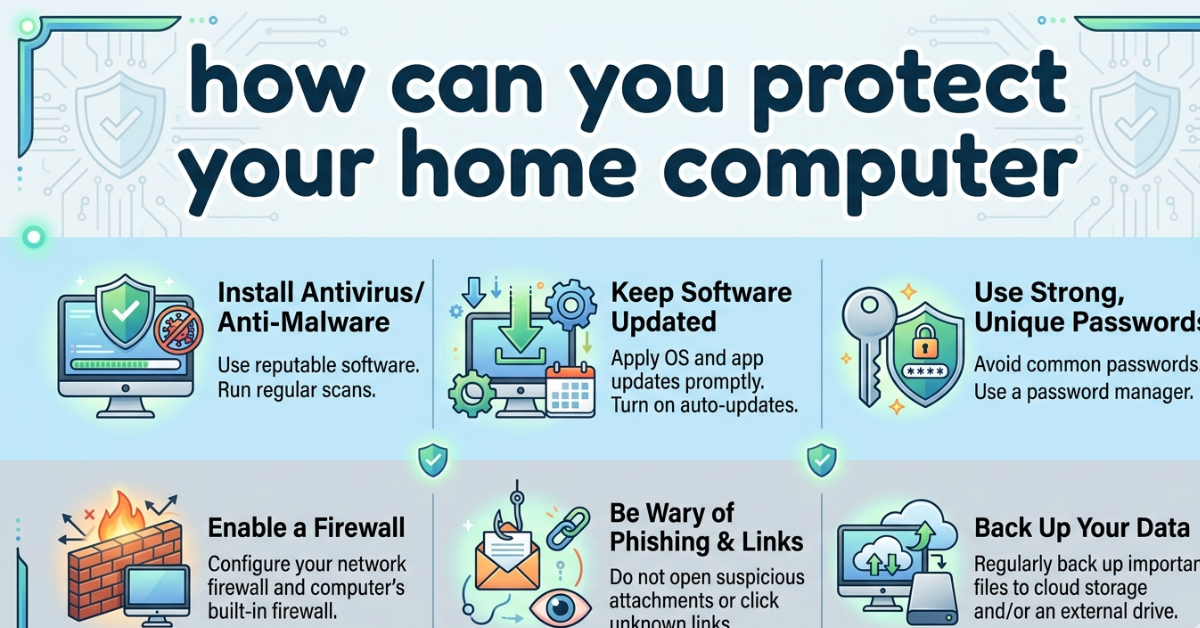
Install Reliable Antivirus and Security Software
One of the easiest ways to protect your device is using trusted security software.
Good protection tools should:
- Detect viruses and malware
- Block suspicious websites
- Scan downloads automatically
- Offer real-time protection
Keeping antivirus software updated ensures your system stays protected against new threats.
Keep Your System and Software Updated
Outdated software is one of the biggest security risks.
Why updates matter:
- Fix security vulnerabilities
- Improve system performance
- Patch bugs that hackers exploit
Make sure to:
- Enable automatic updates
- Update your operating system regularly
- Keep browsers and apps current
This is a key part of cyber awareness how can you protect your home computer strategies.
Use Strong Passwords and Two-Factor Authentication
Weak passwords are like leaving your door unlocked.
Best password practices:
- Use at least 12 characters
- Combine letters, numbers, symbols
- Avoid personal details
- Use different passwords for each account
Extra security tip:
Enable two-factor authentication (2FA) wherever possible. It adds an extra layer of protection even if someone steals your password.
Be Careful with Emails and Downloads
Many cyberattacks start with a simple click.
Avoid:
- Unknown email attachments
- Suspicious links
- Fake websites
- Untrusted downloads
Phishing emails often look real but are designed to steal your information. Always double-check before clicking.
Secure Your Home Wi-Fi Network
Your internet connection is a major entry point for hackers.
How to secure it:
- Change default router passwords
- Use WPA3 or WPA2 encryption
- Hide your network name (SSID) if possible
- Update router firmware
A secure Wi-Fi network is a big step in how can you protect your home computer? effectively.
Use Firewalls for Extra Protection
A firewall acts like a barrier between your computer and threats from the internet.
Benefits include:
- Blocking unauthorized access
- Monitoring incoming traffic
- Preventing suspicious connections
Most operating systems already include built-in firewalls—make sure they are turned on.
Backup Your Important Data Regularly
Even with strong security, accidents can still happen.
Backup options:
- External hard drives
- Cloud storage services
- Automatic backup tools
Regular backups ensure you don’t lose important files in case of cyberattacks or system failures.
Practice Safe Browsing Habits
Smart online behavior is one of the best defenses.
Simple habits include:
- Avoid suspicious websites
- Look for HTTPS in URLs
- Don’t share personal info unnecessarily
- Log out of accounts after use
These small actions play a big role in protecting your system.
FAQs
1. How can you protect your home computer easily?
You can protect it by using antivirus software, strong passwords, regular updates, and safe browsing habits.
2. What is cyber awareness in computer safety?
Cyber awareness means understanding online risks and practicing safe digital behavior to avoid threats.
3. What does “how can you protect your home computer Quizlet” mean?
It usually refers to study flashcards or learning materials about computer security practices.
4. Why is antivirus important?
Antivirus software detects and removes harmful programs before they damage your system.
5. Is public Wi-Fi safe for home computer security?
Public Wi-Fi can be risky because it is easier for hackers to intercept data.
Conclusion
Learning how can you protect your home computer is not just about installing software—it’s about building smart digital habits. From using strong passwords to keeping your system updated, every step adds another layer of protection.
If you stay alert, follow cyber awareness basics, and regularly maintain your system, you can significantly reduce security risks. In today’s connected world, protecting your computer means protecting your privacy, identity, and peace of mind.